Anthony Thomas
The Romeo5 XDR is what happened when Sig listened to the two loudest complaints about the standard Romeo5.
Owners loved the little sight but hated the coin cell, so the XDR runs on a single AAA battery that loads from the front and can be bought in a petrol station on another continent. Owners also wanted more than a plain dot, so the XDR switches between a 2 MOA dot and a 65 MOA circle dot at the hold of two buttons.
Add MOTAC motion activation, a modular riser mount, and a claimed 50,000 hours of runtime, and you have the budget red dot a lot of rifles actually wear.
Sig Sauer Romeo 5 XDR problems, then, are rarely about the concept. They are about the details it depends on: a battery cap that must be properly closed, two buttons doing four jobs with no labels, a motion sensor whose behaviour surprises people in both directions, and mount hardware that has to stay tight.
Quick verdict: The XDR is the Romeo5 to buy if the standard model’s two weaknesses, battery changes and a single reticle, are the ones that bother you. Nearly every problem below is a cap, a button hold, or a screw: user side fixes that cost nothing once you know them.
The genuine failures, a sight that only runs on maximum brightness or a zero that walks with proven tight hardware, are what the Sig Infinite Guarantee is for.
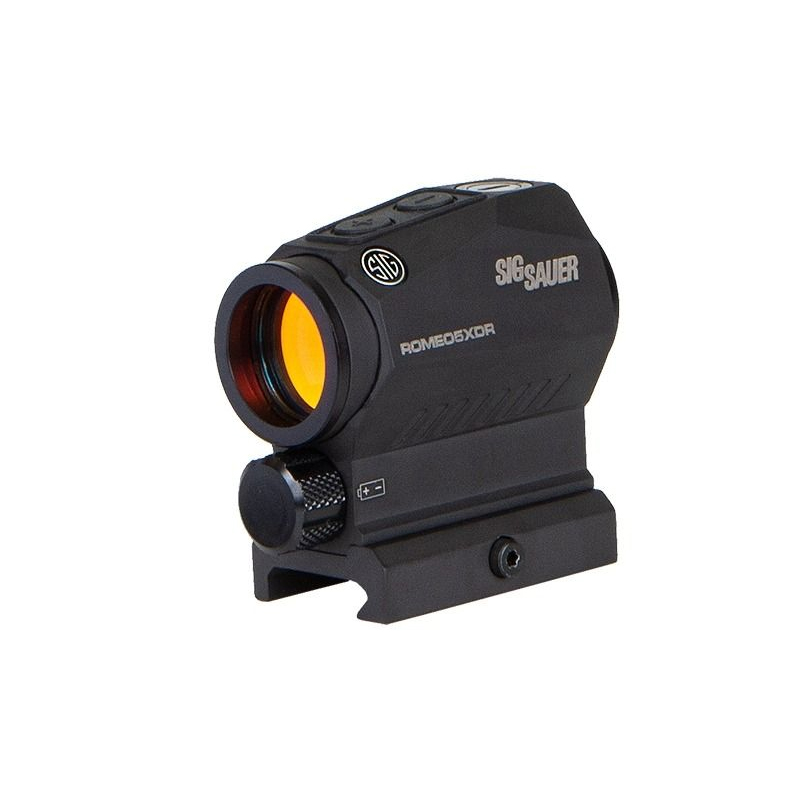
Table of Contents
Sig Sauer Romeo 5 XDR Specs
Reticle: 2 MOA dot or 2 MOA dot with 65 MOA circle, switchable. Predator variant: green reticle with holdover points below the dot.
Magnification: 1x. Objective: 20mm. Housing: aircraft grade aluminium.
Battery: one AAA, front loading. Battery life: up to 50,000 hours claimed, with MOTAC.
Activation: MOTAC motion activation, sleeps after about 2 minutes still. Brightness: 10 settings, 8 daylight and 2 night vision.
Controls: two top buttons: hold for power, click for brightness, hold both for reticle. Footprint: integral M1913 Picatinny riser mount.
Mount heights: 1.41 inch absolute co-witness, 1.63 inch lower third with spacer. Adjustment: 1/2 MOA clicks, caps double as the adjustment tool.
Adjustment travel: 100 MOA windage and elevation. Size: about 2.5 inches long.
Weight: about 5.6 oz with battery. Waterproof: IPX-7.
Warranty: Infinite Guarantee, electronics limited to 5 years.
Sig Sauer Romeo 5 XDR Problems at a Glance
Flickering, dimming, or dead dot. This is the most reported cluster, and medium to high seriousness.
Usually yes, you can fix it yourself. It costs one AAA battery.
Buttons switch the sight off by accident. This is very common when new, and low seriousness.
Yes, learn the holds. It is free.
MOTAC sleeps, stays awake, or stays off. This is common confusion, and low to medium seriousness.
Yes, you can fix it yourself. It is free.
Zero shifts, mount hardware works loose. This is occasional, and medium seriousness.
Usually yes, you can fix it yourself. It costs free checks.
Starburst dot and blue tint. This is common, eye dependent, and low seriousness.
Partly. It costs free, brightness discipline.
Fogging and moisture at the battery cap. This is occasional, and medium seriousness.
Yes, you can fix it yourself. It costs free, one careful cap closing.
1. The Dot Flickers, Fades, or Dies: Start at the Battery Cap
Every Romeo5 family’s most reported failure wears the same face. The dot flickers under recoil.
It fades to nothing on the lower brightness settings. It comes back for a moment, then dies when you raise the rifle.
Or it simply never appears at all.
Start with the most instructive case, from an AR15.com thread whose title, “another sig romeo 5 issue thread”, tells you the forum had seen the pattern before. One owner’s two year old sight stopped working on every setting except the highest, reviving briefly, then dying again as he held the rifle up.
He did the test that matters, swapping in a battery that was running fine in another Romeo5, and the fault stayed with the sight. That unit had a genuine electronics problem, and it went back to Sig.
Keep that ending in mind: it is the end of the diagnostic road, not the start.
Most cases never get there, because most cases are the power supply. Problem guides list the same three causes: a loose battery connection, dirty contacts, and cheap or expired batteries.
On the XDR all three live in one place, the front battery cap, and Sig’s manual points at it directly: failure to properly tighten the cap can lead to intermittent LED illumination. The cap is the contact.
A quarter turn short of home is a flicker waiting for recoil.
One more cause, so specific it has to be true. A reviewer who ran a Romeo5 long term traced his misbehaving dot to sticky adhesive residue left on the contacts by the battery’s pull tab, clear and easy to miss.
Feel your contacts when you change a battery. If they feel tacky, a cotton bud solves it.
How to fix a flickering or dead Romeo5 XDR dot
- Fit a fresh, brand name AAA. Not the one from the television remote. The XDR’s whole selling point is that good AAAs exist everywhere. Use one.
- Clean the contacts while the cap is off. Cotton bud, dry or with a trace of alcohol, the cap contact and the one inside the compartment. Check for the adhesive residue described above.
- Close the cap like the manual means it. Clockwise, finger tight, fully seated. On this sight the cap is part of the electrical circuit and the weather sealing at once.
- Test across all the settings, not just maximum. Click down through the daylight settings in a dim room. A healthy sight is steady everywhere.
- If it still only runs on maximum, stop fixing and send it in. Fresh battery, clean contacts, cap proven tight, same fault: that is an electronics failure, and it is what the warranty exists for. Do not open the sight.
2. The Buttons Do Four Jobs, and One of Them Is Switching the Sight Off
The XDR has two buttons on top, marked plus and minus, and a workload that would tax a smartphone. Short clicks change brightness.
Holding either button for over a second turns the sight on, and also turns it off. Holding both buttons together swaps the reticle between dot and circle dot.
Nothing on the sight explains any of this, and the owner reports write themselves.
A hands on tester at Pyramyd Air installed the battery in his new XDR, clicked the buttons, and got a completely dead sight. He thought he had a bad one.
He did not. He had not read the manual yet, and the manual is the only place that tells you a click does nothing: you hold the button, for what he timed at closer to a second and a half.
The second act plays out at ranges, where a long term reviewer reports hearing shooters complain that their Romeo’s light shuts off while they adjust brightness. It does, because they are holding the button, and holding the button is the off command.
A training issue, in his words. Brightness is clicks. Power is holds.
And then there is the reticle. GAT Daily’s reviewer wanted to swap between dot and circle dot, could not find the method in the instructions he had, and got lucky guessing that holding both buttons did it.
The full manual does document it, but a control owners have to guess at is one many will never use, on a sight they paid extra for to get two reticles.
How to master the XDR’s controls in five minutes
- Learn the three gestures at home. Hold one button, power. Click one button, brightness. Hold both buttons, reticle. Say them out loud once and your hands will remember them.
- Never hold a button to chase brightness. If the dot seems too dim, click plus, click plus, click plus. If the sight went dark mid adjustment, you held, and the fix is a fresh hold to turn it back on, not a warranty email.
- Remember the wake up setting. The sight returns at the brightness it was last using. A sight put away on a low setting wakes up looking dead on a bright day. Hold to power on, then click plus up to a visible level before you judge it.
3. MOTAC Surprises: It Sleeps Fast, Stays Awake on Vehicles, and Respects a Manual Off
MOTAC is the feature owners praise in reviews and curse in forums, usually for one of three behaviours, all of which are the design working as documented.
Behaviour one: the sight goes to sleep after roughly two minutes of stillness. The manual says approximately 120 seconds without motion.
One tester who timed his sample measured closer to 220 seconds, so call it two to four minutes depending on the unit. Either way, a rifle standing in a corner safe presents a dark window until it moves.
That is the battery saving working, and a genuine surprise the first time it happens on a line.
Behaviour two: on anything that vibrates, the sight never sleeps at all. A reviewer who carries rifles on a four wheeler made this point: the motion sensor keeps the sight awake for the whole ride, so a gun that lives on a vehicle or a boat can chew through battery at a rate the 50,000 hour headline never mentioned.
His fix is the manual one: if the rifle lives on a machine, switch the sight fully off for transport.
Behaviour three is the mirror image. If you deliberately hold a button and switch the sight off, MOTAC is off with it.
Motion will not wake a manually killed sight. An owner on AR15.com asked exactly this while planning to practise with his iron sights: is there an override, and will the dot stay off?
Yes, and yes, until you hold a button again. Owners who forget they parked the sight manually then report that shake awake has stopped working.
How to set MOTAC expectations correctly
- Leave it on for a defensive rifle, off for a transported one. A home defence rifle wants MOTAC armed, so the dot wakes in your hands. A rifle that rides on a vehicle wants a manual off, so the ride does not drain it.
- Keep backup irons zeroed and practise with them. Know how to run the gun with the dot deliberately off, and you are covered for a dead battery, a sleeping sight, and everything in between.
- If motion never wakes it and it was not manually switched off, that is a fault. Battery first, as always. Then Sig. A dead motion sensor on a sight whose headline feature is the motion sensor is a warranty conversation with no argument in it.
4. Zero Shifts: Check Three Sets of Screws Before Blaming the Optic
A wandering zero on this platform usually has a mechanical address, because the XDR’s mount is not one piece of hardware. It is a stack.
The sight clamps to the rail with a single crossbolt. Under it sits a modular riser base. If you fitted the included spacer for the lower third height, there is a spacer plate in the stack too, held by four long Torx screws.
Three interfaces, three chances for something to be slightly less than tight, and a zero that moves in a way the owner describes as the optic losing zero. The platform’s own troubleshooting starts in the same place: if the zero will not hold, check all mounting screws.
Problem guides collect owner complaints about the included mount itself disturbing settings and forcing repeated re-zeroing, with the advice to have Sig replace a bad mount. Against that, reviewers who mounted carefully report zeros holding for years.
Both can be true, on different rifles with different torque habits.
How to fix a Romeo5 XDR that will not hold zero
- Strip the stack and rebuild it once, properly. Sight off, spacer off if fitted, every thread and mating surface cleaned. Reassemble in order: spacer screws even and snug, base seated, and the crossbolt pushed forward against a rail slot as you tighten it with the T10 tool, so recoil drives the mount into the slot instead of walking it along the rail.
- Use a torque driver if you have one, and even pressure if you do not. Follow any torque guidance in the manual, tighten in small alternating steps, and do not lean your whole weight on a T10 key.
- Witness mark everything. A paint pen line across the crossbolt and each spacer screw turns invisible loosening into a five second visual check before every range trip.
- Confirm the zero, then test the theory. Fire a group, let the rifle cool, fire another. A zero stable across a session with proven tight hardware is a fixed problem. A zero that still wanders is no longer a mount story, and that is when you contact Sig, with your notes as evidence you did your half.
5. The Dot Starbursts, the Glass Has a Tint, and the Window Is Small

Three picture quality complaints follow the Romeo5 family around, and the XDR inherits all of them, because it shares the 20mm window and the LED emitter.
The starburst first. A reviewer testing the platform found the reticle starbursts when the brightness is cranked higher than the conditions need, on a cloudy day in his test, and his fix is the whole fix: turn it down until it is right.
That is doubly true for shooters with astigmatism, whose eyes turn any over bright dot into a comet. Problem guides give astigmatism its own section and land on the same advice, plus one XDR specific option: the Predator variant’s green reticle, which a share of astigmatic shooters see more cleanly than red.
The tint second. A long term reviewer’s honest knock on the glass was a slight blue cast when you first look through it, which your eye adjusts to and stops registering. Judge it after ten minutes of shooting, not in the shop.
The parallax third is mostly perception. Owners report the dot seeming to move at the edges of the window. The platform is built to be ultra low parallax, and the practical answer is consistent head placement and the centre of the window, which on a 20mm tube matters more than on a big window sight.
How to get the cleanest picture from an XDR
- Set brightness for the target in front of you. A dot just clearly visible beats a dot at maximum in almost every condition, and it kills most starburst on the spot.
- Try the circle dot if the dot alone blooms for you. Some eyes read the ring as cleaner than the point, and it costs you one button hold to find out.
- If astigmatism is your issue, look through a green Predator before buying red. Eyes differ enough that this is a test only you can run, but the variant exists largely because of shooters like you.
- Clean the lens properly. Blow dust off first, then the lens cloth from the box. Half the hazy dots reported on every red dot ever made are fingerprints.
6. Fogging and Moisture: The Front Cap Is Part of the Sealing System
The XDR is rated IPX-7, and a reviewer from this platform’s family proved it the direct way, dunking a Romeo5 in a bathtub with the dot lit and pulling it out running. So why do owners report fogged lenses and damp battery compartments?
Read the manual’s battery cap note again, because it connects the dots in one sentence: a cap that is not properly tightened can cause intermittent illumination or allow moisture into the battery compartment.
On the XDR the cap is a big friendly front door you open with your fingers at every battery swap, and friendly doors get left a quarter turn from closed far more often than a cap closed with a tool. The platform troubleshooting for internal fogging adds the rest: temperature changes can cause temporary condensation, let the sight acclimate, and if it persists, check that the battery compartment is properly sealed.
The sealing system is good. Its weakest point is the one part owners handle constantly.
How to keep an XDR dry inside
- Close the cap fully, every time. Finger tight means seated, threads started square. If it resists early, back it off and start again, because a cross threaded cap is a cap that is not sealing.
- Check the seal area at every battery change. Wipe grit from the threads and sealing surface before closing. The grit that stops a cap seating is the grit that lets water in.
- Let a cold sight warm up before judging fog. Condensation from a hard temperature swing usually clears as the sight acclimates. Fog that returns in mild conditions, or visible water in the battery tube, is a sealing problem, and that is a Sig conversation.
- Swap the battery on a calendar for stored guns. Fresh AAA every year or two. The old one goes in a remote control, where a leak costs nothing.
Sig Sauer Romeo 5 XDR Problems That Are Not Really Faults
The dot is invisible because it is on a night vision setting. Two of the ten settings are NV levels, invisible in daylight by design.
Reviewers note new owners regularly report a dead dot that is simply turned down too low to see. Click plus up through the settings in a dim room before concluding anything.
It switched off while you were glassing. That is MOTAC’s roughly two minute sleep, and the dot returns the instant the rifle moves. If it does not return, you either switched it off manually, or the battery is done.
A suspiciously cheap one misbehaves. Counterfeit Romeo5s are a documented nuisance, and buying guides warn about them for a reason.
If yours came from an authorised dealer, this is not your problem. If it came from an auction listing at half price with blurry box print, it might be the whole problem, and Sig cannot warranty a sight they never made.
Sig Sauer Romeo 5 XDR Maintenance Checklist
- Close the battery cap fully and squarely after every battery change
- Fit a fresh brand name AAA, and change stored guns’ batteries yearly or so
- Feel the battery contacts for adhesive residue when you swap cells
- Learn the three button gestures: hold for power, click for brightness, hold both for reticle
- Check the mount crossbolt and spacer screws against their witness marks
- Confirm zero after any remount, and after the first box of full power ammunition
- Blow dust off the lens before wiping, and use the cloth from the box
- Manually switch the sight off for vehicle transport, leave MOTAC armed at home
Is the Sig Sauer Romeo 5 XDR Still Worth Buying?
Yes, and it is arguably the version of the Romeo5 that makes the most sense in 2026.
Read the problem list back and notice what is missing from it. There is no pattern of dead emitters, no zero that will not settle once the hardware is tight, no battery that dies in a month.
What there is: a cap that must be closed properly, buttons that must be learned, a motion sensor whose rules must be understood, and glass that is good rather than great. Those are ownership skills, and they separate the owners who rave about this sight from the owners writing frustrated reviews of it.
Against its own sibling, the XDR wins on the things owners actually touch: a battery you can buy anywhere and change without tools, and a second reticle for close work. Against everything else at the price, it wins on the grounds the Romeo5 always has: it is the budget dot that behaves like a serious one.
Buy it from a real dealer, set it up properly, and it will likely outlast your interest in the rifle under it.
Conclusion
Sig Sauer Romeo 5 XDR problems have a pattern, and once you see it, the sight gets very easy to own.
Almost everything on the list runs through three small pieces of hardware: a battery cap, two buttons, and a stack of mount screws. The cap must be closed properly, because it completes the circuit and the weather seal at once.
The buttons must be learned, because they do four jobs with two faces. The screws must stay tight, because three interfaces are three chances to loosen. Master those, and the complaints that fill the forums never happen to you.
The faults left over are rare, recognisable, and covered by a guarantee with a good reputation.
That is why this little sight keeps being the default recommendation at its price, and why the XDR is the version to pick: the most available battery on earth, two reticles, a motion sensor that works while you sleep, and a problem list you have already solved. Set it up once, properly, and go shooting.
Sources used for this article: the Sig Sauer ROMEO5 X and XDR owner manual, Sig product material via B&H Photo, Vance Outdoors, Western Metal and Kentucky Gun Co, owner threads on AR15.com, hands on tests and reviews from Pyramyd Air, GAT Daily, Top Firearm Reviews, CAT Outdoors, Badass Optic, TheGunZone and Primer Peak, and the BestRedDotSight, The Wild Hunter and RedDotHeaven problem guides. Last updated: October 2026.
FREQUENTLY ASKED QUESTIONS
Work the power supply first. A flickering dot is usually the battery cap not fully seated, dirty or tacky contacts, or a weak AAA. Sig’s manual warns that a loose cap causes intermittent illumination. Fit a fresh brand name AAA, clean the contacts, close the cap fully. If the sight then only works on the highest setting, that points to an electronics fault, and owners have had those units replaced under warranty.
One AAA, loaded from the front, unlike the standard Romeo5 which uses a CR2032 coin cell. Sig claims up to 50,000 hours under normal use with MOTAC switching the sight off when still. Real life depends on brightness and on whether the rifle sits somewhere that vibrates, since motion keeps the sight awake. A fresh AAA every year or two keeps you far from the bottom of it.
Press and hold both the plus and minus buttons at the same time, then release to select. That toggles between the 2 MOA dot and the 65 MOA circle dot. It is the control owners most often fail to find. Brightness is short clicks of one button, power is holding one button for over a second.
That is MOTAC working as designed. The sight powers down after roughly two minutes without motion, the manual says about 120 seconds and one tester timed his at closer to 220, and it wakes at your last setting the moment the rifle moves. If yours never wakes on motion, check whether you switched it off manually, because a manual off disables MOTAC until you hold a button again.
Three things. The XDR runs a front loading AAA battery instead of a side loaded CR2032. It adds a switchable circle dot reticle alongside the 2 MOA dot. And it is rated at up to 50,000 hours against the standard model’s 40,000 plus. Mount, MOTAC, and controls are shared, which is why sig sauer romeo 5 xdr problems threads so often mix the two models up.
Check the hardware stack before the optic. The mount is a base, an optional spacer plate on four Torx screws, and a single crossbolt, and any loose element shifts the zero. Rebuild it cleanly, seat the crossbolt against a rail slot, tighten evenly, witness mark the screws, and confirm with two groups. A zero that still wanders with proven tight hardware is a warranty case.
It is rated IPX-7, and reviewers in this sight family have submerged one with the dot lit and had it come out running. The weak point is owner operated: the front battery cap is part of the sealing system, and a cap left a quarter turn loose can let moisture into the battery compartment, per Sig’s own manual note. Close it fully and check the seal area for grit at every battery change.